In electronics, all the tiny parts inside a device need a way to talk to each other. Whether you’re dealing with microcontrollers, sensors, memory chips, or small displays, they all exchange data constantly. How they do that is what makes embedded systems work smoothly.
Among the different ways devices communicate, two protocols show up almost everywhere: I2C and SPI. Both send data in a serial way, but they work differently in terms of speed, wiring, and how many devices they can handle. In this blog, we’ll break them down in a simple, practical way—how each one works, what they’re good at, where they fall short, and how to know which one fits your project better.
What Are Serial Communication Protocols?
Serial communication is a method where data is sent bit-by-bit over a small number of wires. Instead of transmitting entire bytes at once (parallel communication), serial methods simplify wiring and reduce PCB trace requirements.
Common serial protocols include:
UART
I2C
SPI
But I2C and SPI stand out because they support multiple peripherals and offer flexibility in system design.
I2C Communication — Inter-Integrated Circuit
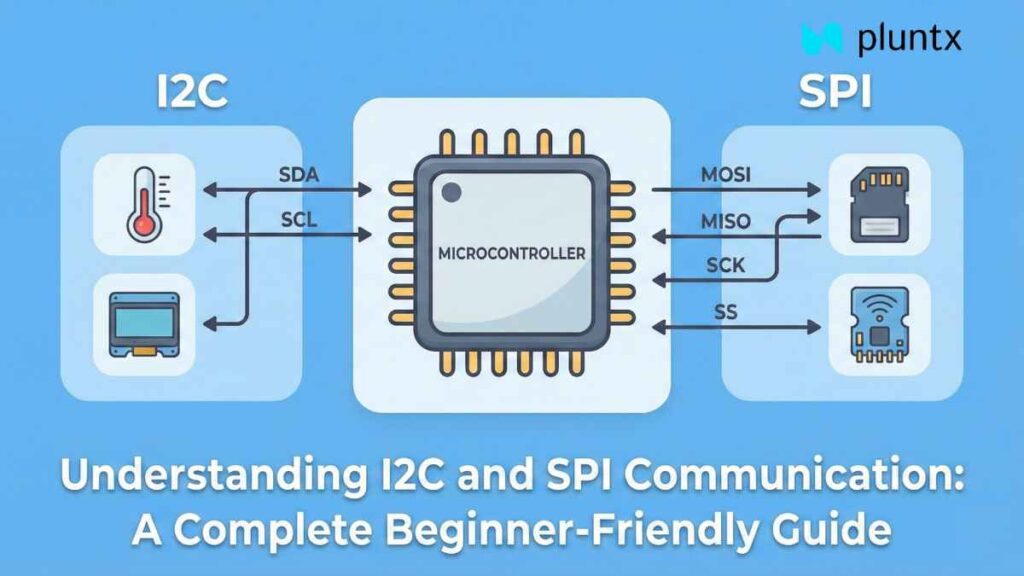
I2C is a two-wire, synchronous communication protocol originally designed by Philips. It allows multiple slave devices and even multiple masters to share the same communication bus, making it ideal for sensor-packed designs.
How I2C Works
I2C uses just two lines:
SDA (Serial Data Line)
SCL (Serial Clock Line)
The master device controls the clock signal. Every device on the bus has a unique address, allowing the master to select which device it wants to communicate with.
The communication sequence typically follows:
Start condition
Slave address + Read/Write bit
ACK/NACK from slave
Data transmission
Stop condition
All devices share the same wires, so signal integrity depends heavily on proper pull-up resistors.
Features of I2C
Supports multiple slave devices with unique addresses
Can communicate with many devices using only two wires
Supports different speeds:
Standard Mode (100 kHz)
Fast Mode (400 kHz)
Fast Mode Plus (1 MHz)
High-Speed Mode (3.4 MHz)
Advantages of I2C
Very simple wiring
Addressing makes multitasking easy
Good for low-speed peripheral communication
Efficient for short distances inside PCBs
Limitations of I2C
Shared bus reduces speed compared to SPI
More complex protocol due to addressing and ACK/NACK bits
Not ideal for long distances
More susceptible to noise
Common Applications of I2C
Real-time clocks (DS3231)
Temperature/pressure sensors
Accelerometers/gyroscopes (MPU6050, MPU9250)
OLED displays
Low-power microcontrollers

SPI Communication — Serial Peripheral Interface
SPI is a full-duplex, high-speed communication protocol developed by Motorola. It is designed for situations where speed and reliability matter more than wiring simplicity.
How SPI Works
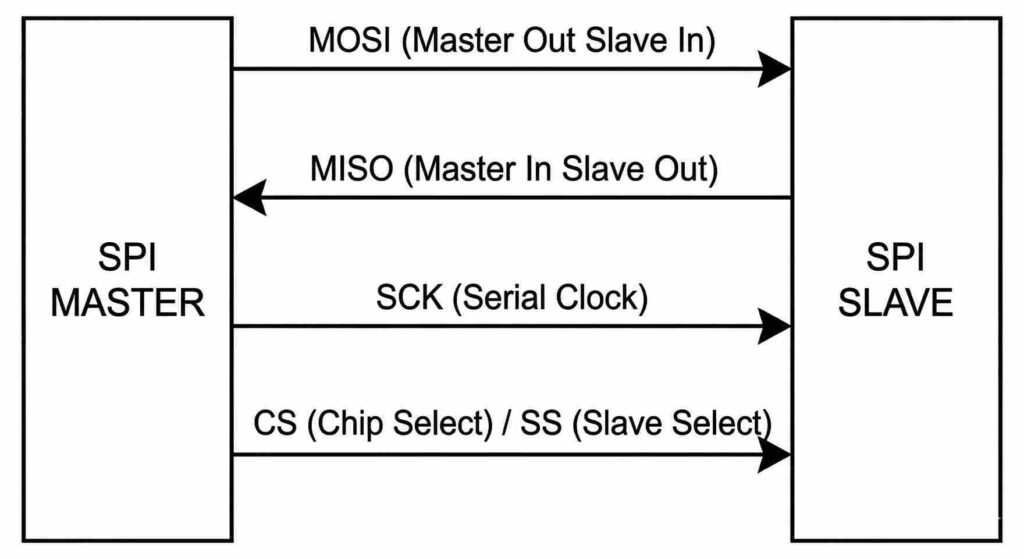
SPI uses at least four wires:
MOSI – Master Out Slave In
MISO – Master In Slave Out
SCK – Clock from master
SS/CS – Chip Select (one per slave device)
Data flows in both directions simultaneously, making SPI significantly faster.
Features of SPI
Full-duplex communication
Very high operating speeds (10 MHz to 50+ MHz depending on hardware)
Simple protocol without addressing
Each slave device needs its own CS pin, though daisy-chain configurations also exist
Advantages of SPI
Extremely high data rates
Ideal for fast sensors and memory devices
More stable on long traces
No addressing → simpler decoding and less overhead
Limitations of SPI
Requires more pins
More complicated wiring when multiple devices are connected
No standard acknowledgement like I2C
Common Applications of SPI
SD cards
TFT/LCD displays
High-speed ADCs and DACs
Flash memory chips
Wireless modules (nRF24L01, LoRa)
I2C vs SPI: Detailed Comparison Table
| Feature | I2C | SPI |
|---|---|---|
| Communication lines | 2 wires | 4 wires minimum |
| Speed | Up to 3.4 MHz | 10–50+ MHz |
| Data direction | Half-duplex | Full-duplex |
| Number of devices | Many (addressed) | Many (each needs CS pin) |
| Protocol complexity | High | Low |
| Distance handling | Short | Short–medium |
| Typical use | Sensors, low-speed modules | Displays, memory, data-heavy modules |
When Should You Use I2C or SPI?
Use I2C when:
You need to connect many sensors
Wiring must remain minimal
Speeds below 1 MHz are acceptable
PCB space is limited
You want simple daisy-chain-like connectivity
Use SPI when:
You need high-speed communication
You are working with memory chips, displays, or SD cards
Full-duplex communication is important
You can afford additional GPIO pins
Low-latency communication matters
Real Examples in Electronics Projects
Example 1 — Sensor Hub
If your project includes multiple sensors like temperature, humidity, pressure, accelerometer, and RTC, I2C is perfect because all sensors can share the same bus.
Example 2 — Display + SD Card
A large TFT display and an SD card both require high bandwidth and fast updates. SPI is the clear winner here.
Example 3 — Mixed System
Sometimes, devices use both protocols. For example:
Connect your sensors using I2C
Connect your display and SD card using SPI
Understanding I2C and SPI communication is fundamental for anyone building microcontroller-based projects. Both protocols have their strengths:
I2C excels in multi-device, low-speed, minimal wiring scenarios
SPI is the go-to for high-speed, low-latency communication
Choosing the right protocol depends on your design requirements—speed, wiring complexity, number of peripherals, and the type of data you’re transferring.
About pluntx

Pluntx is India’s leading platform for electronics and 3D printing solutions, offering a wide range of products like Arduino, Raspberry Pi, drone parts, sensors, 3D printer components, and more. We also provide expert CAD design services and affordable 3D printing, starting at just ₹49. Click here to explore our extensive collection of electronics and prototyping tools. Be sure to follow us on Instagram and YouTube, where we regularly share tutorials, tips, and updates on everything from Arduino projects to drone technology. Pluntx delivers precision and quality. Our mission is to empower creativity through technology and simplify the journey from concept to creation.